


Cloud node is a computing resource that operates within a cloud infrastructure and helps run applications, process workloads, store or transfer data, and support distributed cloud services. Depending on the architecture, a node may be a virtual machine, physical server, worker machine, storage resource, or another computing instance connected to a larger cloud environment.
For Indian businesses adopting SaaS, cloud-native applications, AI workloads, e-commerce platforms, and digital services, understanding cloud nodes is useful because nodes are fundamental building blocks of many scalable computing environments.
This guide explains what a cloud node is, how it works, major node types, cloud nodes versus traditional servers, benefits, limitations, security considerations, deployment steps, costs, and practical factors to consider before implementation.
What Is a Cloud Node?
A cloud node is an individual computing resource connected to a cloud-based system or distributed computing environment. It contributes processing power, memory, storage, networking, or application capacity to the larger infrastructure.
The exact meaning of “node” depends on the technology being used.
For example, in a Kubernetes cluster, a node is a machine where containerized workloads can run. In a distributed storage environment, nodes may contribute storage capacity. In other cloud architectures, a node can refer more generally to an individual server or computing instance participating in the system.
A typical node can contain or provide:
- CPU resources
- RAM
- Storage
- Network connectivity
- Operating system resources
- Runtime environments
- Containers or virtual machines
- Monitoring and security agents
Instead of relying on one large server for everything, modern systems can distribute workloads across multiple nodes.
How Does a Cloud Node Work?
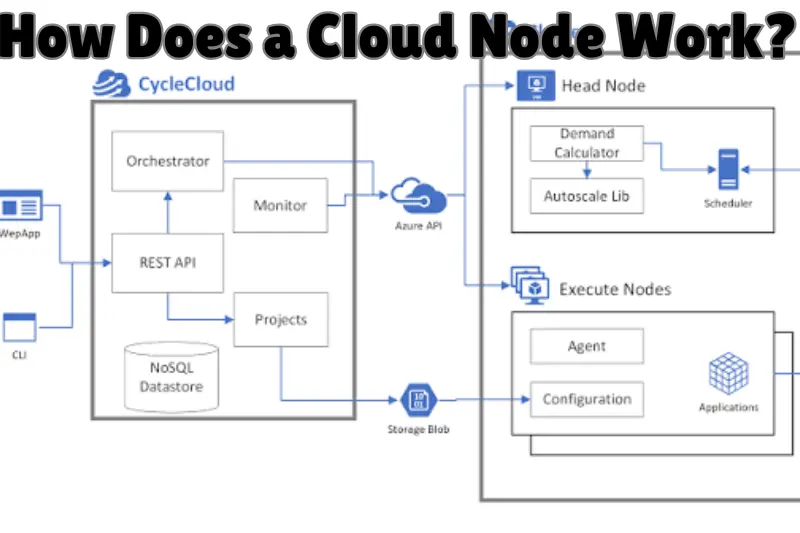
A cloud node works by contributing computing resources to a larger cloud environment and receiving workloads according to the architecture’s scheduling, networking, and management rules.
Imagine an Indian SaaS company running an application that suddenly receives significantly more traffic. If the application is designed for horizontal scaling, additional compute instances or worker nodes can be added so that demand is distributed across more resources.
The basic process generally looks like this:
- A node is provisioned within the cloud environment.
- The operating system, runtime, networking, and required software are configured.
- The node joins the relevant cluster or infrastructure.
- Applications or workloads are assigned to available resources.
- Monitoring systems track resource consumption and availability.
- Capacity can be increased, reduced, replaced, or redistributed according to demand and configuration.
The exact process varies substantially between virtual machines, Kubernetes, serverless platforms, private clouds, and managed cloud services.
Cloud Node Architecture Explained
A cloud environment commonly contains several layers.
Infrastructure layer: Provides underlying compute, storage, and networking resources.
Virtualization or container layer: Helps isolate workloads and make infrastructure more flexible.
Management layer: Handles provisioning, monitoring, scheduling, access, policies, and resource allocation.
Application layer: Contains websites, SaaS platforms, APIs, databases, microservices, or business applications.
A node participates in one or more of these layers depending on its assigned role.
Main Types of Cloud Nodes
Cloud nodes are not all identical. Their responsibilities depend on the cloud architecture and workload.
1. Compute Nodes
Compute nodes primarily provide processing capacity.
They can run:
- Web applications
- SaaS software
- APIs
- Background jobs
- Data processing workloads
- Business applications
- AI or machine-learning workloads
Compute nodes are particularly useful when applications need scalable CPU or memory resources.
2. Worker Nodes
Worker nodes are common in container orchestration platforms such as Kubernetes.
They execute application workloads assigned by the cluster’s control components. A worker node can run multiple containers grouped into application units such as Kubernetes Pods.
For cloud-native SaaS applications, worker nodes make it easier to distribute workloads across several machines.
3. Storage Nodes
Storage nodes focus primarily on storing and serving data.
They can form part of distributed storage systems in which information is spread or replicated across multiple machines.
Their role may include:
- Persistent data storage
- Replication
- Backup-related capacity
- Distributed file storage
- Object or block storage infrastructure
The exact capabilities depend on the storage technology.
4. Control Plane Nodes
In cluster-based systems, control plane components coordinate and manage the environment.
In Kubernetes, for example, the control plane handles tasks such as maintaining the desired state of the cluster and scheduling workloads.
Production architectures usually separate management responsibilities carefully to improve reliability and security.
5. Edge Nodes
Edge nodes bring computing resources closer to users, devices, or data sources.
Instead of sending every operation to a distant central data centre, some processing can occur closer to where data is generated or consumed.
This can be useful for applications involving:
- IoT
- Manufacturing
- Content delivery
- Real-time processing
- Retail technology
- Location-sensitive services
Cloud Node vs Traditional Server
A cloud node and a traditional server can perform similar computing tasks, but their provisioning and management models can be very different.
| Feature | Cloud Node | Traditional On-Premises Server |
|---|---|---|
| Provisioning | Often software-driven and fast | Usually requires physical setup |
| Scaling | Can support flexible horizontal or vertical scaling | Often requires hardware upgrades or new servers |
| Infrastructure ownership | Usually provider or cloud operator | Usually organisation-owned |
| Initial hardware investment | Often lower for public cloud | Can require significant upfront hardware |
| Management | Can be highly automated | Often involves more direct hardware management |
| Availability design | Can span multiple nodes or zones | Depends on local infrastructure design |
| Billing | Often usage or subscription based | Hardware purchase plus operating costs |
Neither approach is automatically superior.
An on-premises server may make sense when an organisation needs direct physical control, has specific regulatory requirements, or already operates suitable infrastructure. Cloud nodes are often attractive when flexibility, rapid provisioning, and scalable capacity are priorities.
Why Are Cloud Nodes Important for SaaS?
Cloud nodes help SaaS companies distribute workloads, scale applications, improve infrastructure flexibility, and build more resilient architectures.
A SaaS product may serve hundreds or thousands of users simultaneously. Traffic can also fluctuate considerably throughout the day.
With a well-designed multi-node architecture, the application does not necessarily depend on one machine.
Scalability
Applications can distribute workloads across additional resources as demand increases.
This is commonly known as horizontal scaling when more machines or instances are added.
Better Availability
A properly designed distributed architecture can reduce dependence on a single machine.
However, simply having several nodes does not guarantee high availability. Load balancing, redundancy, health checks, data replication, network design, and failover mechanisms must also be configured correctly.
Workload Isolation
Different workloads can be separated across resources.
For example, a SaaS platform might dedicate different capacity to:
- Front-end services
- APIs
- Databases
- Background processing
- Analytics
- Internal services
This separation can improve resource management and troubleshooting.
Automation
Modern cloud platforms can automate provisioning, monitoring, scaling, and replacement of infrastructure.
Automation can reduce repetitive administration, although it still requires careful configuration and oversight.
Benefits of Using Cloud Nodes
The main advantages of cloud nodes come from flexibility, distributed architecture, and the ability to allocate resources according to application requirements.
Flexible Scaling
Resources can often be expanded when demand increases and reduced when demand falls.
This is particularly useful for seasonal businesses, SaaS products, e-commerce stores, and applications with unpredictable traffic.
Faster Infrastructure Provisioning
Creating a cloud instance can be much faster than purchasing, installing, and configuring a physical server.
This can shorten development and deployment cycles.
Improved Resource Utilisation
Applications can be distributed according to CPU, memory, storage, and networking requirements.
Proper scheduling helps organisations avoid concentrating every workload on a single machine.
Geographic Flexibility
Major cloud platforms operate infrastructure in multiple regions and availability zones.
Businesses can select deployment locations based on factors such as latency, availability requirements, service availability, compliance obligations, and cost.
Easier Infrastructure Experimentation
Development teams can create temporary environments for testing, development, staging, or proof-of-concept projects and remove them when they are no longer required.
This flexibility can be especially valuable for growing software teams.
Cloud Nodes and Cloud Implementation Services
Cloud implementation services help organisations plan, configure, migrate, secure, and operate cloud infrastructure. These services can include the deployment and management of compute nodes, networking, storage, databases, monitoring systems, and application environments.
A cloud implementation project may cover:
- Cloud architecture planning
- Workload assessment
- Application migration
- Virtual machine configuration
- Kubernetes deployment
- Identity and access management
- Networking
- Backup configuration
- Monitoring
- Security controls
- Cost optimisation
- Disaster recovery planning
For an Indian company moving from local servers to cloud infrastructure, professional implementation support may be useful when internal teams lack cloud architecture, security, DevOps, or migration experience.
The goal should not simply be “move everything to the cloud.” A successful implementation determines which workloads should move, how they should be structured, what controls are necessary, and how operating costs will be managed.
How to Set Up a Cloud Node
The exact setup depends on the cloud provider and architecture, but a structured process reduces configuration mistakes.
Step 1: Define the Workload
First determine what the node will actually do.
Is it intended for:
- A website?
- SaaS application?
- API?
- Database?
- Development environment?
- Container workload?
- Data processing?
- AI workload?
The workload determines CPU, memory, storage, networking, and availability requirements.
Step 2: Select a Deployment Model
Choose between public cloud, private cloud, hybrid infrastructure, or another architecture based on business requirements.
Do not select an architecture simply because it is popular.
Step 3: Choose the Appropriate Region
For an India-focused service, consider latency, available cloud regions, data requirements, service availability, business continuity, and pricing.
The nearest region is not automatically the best option in every case.
Step 4: Select Node Resources
Choose suitable:
- vCPU
- RAM
- Storage type and capacity
- Network configuration
- Operating system
- Instance family
Start from realistic workload requirements rather than automatically choosing the largest machine.
Step 5: Configure Networking
Networking may include:
- Virtual networks
- Subnets
- Routing
- Firewalls
- Security groups
- Private networking
- Public IP addresses
- DNS
- Load balancers
Expose only the services that genuinely need external access.
Step 6: Apply Security Controls
Use identity-based access, secure credentials, encryption where appropriate, updates, monitoring, logging, and restrictive network policies.
Security should be part of the original architecture rather than added after deployment.
Step 7: Deploy the Application
Install or deploy the required application, runtime, containers, agents, and supporting services.
Infrastructure-as-code tools can make repeat deployments more consistent.
Step 8: Configure Monitoring
Track metrics such as:
- CPU utilisation
- Memory usage
- Storage consumption
- Network traffic
- Application errors
- Response times
- Node availability
Monitoring helps teams identify both performance and cost problems.
Step 9: Test Failure Scenarios
Do not test only whether the application works normally.
Also test what happens when:
- A node becomes unavailable
- Traffic rises sharply
- Storage reaches a threshold
- A dependency fails
- Network connectivity is interrupted
Resilience needs to be verified rather than assumed.
Cloud Node Security Best Practices
A cloud node is only as secure as its configuration, software, credentials, network exposure, and operational practices.
Follow Least-Privilege Access
Users and services should receive only the permissions necessary to perform their tasks.
Avoid giving administrator-level access by default.
Keep Systems Updated
Operating systems, container images, libraries, and applications should receive appropriate security updates.
Unmaintained software can increase exposure to known vulnerabilities.
Restrict Network Access
Avoid exposing management interfaces or unnecessary ports directly to the public internet.
Use private networking and tightly scoped access rules where possible.
Protect Credentials
Do not store passwords, API keys, or cloud credentials directly inside application source code.
Use appropriate secrets-management mechanisms.
Enable Logging and Monitoring
Security logs help teams investigate suspicious access, unexpected configuration changes, and operational problems.
Plan Backups Separately
High availability and backups solve different problems.
Running several nodes does not automatically protect against accidental deletion, corruption, or other data-loss events. Important data should have an appropriate backup and recovery strategy.
Cloud Node Costs in India
There is no single fixed cloud node price in India. Cost depends on the provider, instance configuration, region, operating system, storage, bandwidth, licensing, and usage pattern.
Typical cost components include:
- Compute time
- RAM and CPU configuration
- Storage
- Data transfer
- Load balancing
- Public IP resources
- Backups
- Monitoring
- Managed services
- Software licences
A common mistake is evaluating only the hourly or monthly compute price.
Network transfer, storage growth, backup retention, database services, logging, and idle resources can materially affect the final cloud bill.
How to Control Cloud Costs
Use right-sized instances instead of unnecessarily powerful machines.
Remove unused development resources, monitor storage growth, configure scaling carefully, and use provider cost-management tools.
For predictable long-term workloads, providers may also offer pricing commitments or reserved-capacity models. Their suitability depends on how stable the workload is.
Cloud Node Limitations
Cloud nodes provide flexibility, but they also introduce operational challenges.
Cost Can Become Difficult to Predict
Usage-based pricing is convenient but can produce unexpected bills when resources are poorly monitored.
Distributed Systems Are More Complex
Multiple nodes introduce networking, orchestration, observability, data consistency, and failure-management challenges.
Provider Dependency
Applications built heavily around provider-specific services can become harder to migrate.
This is commonly discussed as vendor lock-in.
Internet and Network Dependency
Cloud services depend heavily on reliable networking. Connectivity problems can affect application access and administration.
Skills Are Still Required
Managed cloud platforms reduce infrastructure work, but they do not eliminate the need for architecture, security, monitoring, and cost-management knowledge.
Common Cloud Node Mistakes to Avoid
Many cloud problems result from configuration and architecture choices rather than the underlying cloud technology.
Overprovisioning resources: Large instances are not always better. Oversized nodes can waste money.
Ignoring monitoring: Without metrics and alerts, performance and cost issues can remain unnoticed.
Using excessive permissions: Broad administrator access increases security risk.
Relying on a single node: A critical production service running on one node may still have a single point of failure.
Confusing replication with backup: Multiple copies of live data are not necessarily a substitute for independent backups.
Skipping recovery testing: A backup strategy is incomplete if restoration has never been tested.
Migrating without planning: Moving an inefficient architecture directly into the cloud can transfer existing problems rather than solve them.
How to Choose the Right Cloud Node Configuration
The best configuration is the one that meets workload requirements without unnecessary complexity or cost.
Evaluate five areas before deployment.
Performance: Estimate CPU, RAM, storage, and network requirements.
Availability: Decide how much downtime the application can tolerate.
Security: Identify access controls, encryption, network restrictions, logging, and compliance requirements.
Scalability: Determine whether demand is stable, seasonal, or unpredictable.
Budget: Estimate the complete cost, including compute, storage, networking, backups, and supporting services.
For a small SaaS project, starting with a simple architecture may be more sensible than immediately building a complex multi-node platform.
Architecture should evolve when real usage and business requirements justify it.
Cloud Nodes for Indian Businesses
Cloud nodes can support Indian startups, SaaS companies, enterprises, e-commerce businesses, development car cloud auto group agencies, and organisations modernising legacy infrastructure.
They are especially useful where businesses need flexible computing capacity without purchasing and maintaining every physical server themselves.
Potential use cases include:
- SaaS hosting
- E-commerce applications
- Business software
- Development and testing
- Data processing
- API hosting
- Containerized applications
- Analytics platforms
- Backup infrastructure
- Enterprise application modernisation
Indian businesses should evaluate technical requirements cloud bag alongside data governance, contractual requirements, applicable regulations, service availability, and operational costs before selecting a cloud architecture.
Understanding Similar “Cloud” Search Terms
Not every phrase containing the word “cloud” refers to cloud computing.
For example, st cloud movie theater is generally a location or entertainment-related search phrase rather than a cloud infrastructure concept. Similarly, cloud bag can refer to products or brands depending on the searcher’s context.
These terms should not be confused with cloud nodes, cloud servers, cloud computing, or cloud implementation services.
For users researching SaaS infrastructure, relevant concepts include virtual machines, containers, Kubernetes nodes, distributed systems, cloud storage, networking, scalability, and infrastructure automation.
Understanding search intent prevents unrelated meanings of the word “cloud” from being mixed with technical cloud-computing information.
Frequently Asked Questions
What is a cloud node in simple terms?
A cloud node is an individual computing resource that participates in a larger cloud or distributed system. Depending on the architecture, it can provide processing power, memory, storage, networking, or a place to run applications. Multiple nodes can work together to distribute workloads and support scalable services.
Is a cloud node the same as a cloud server?
Not always. A cloud server usually refers to a virtual or physical server provided through cloud infrastructure. “Node” is a broader architectural term. A server can function as a node, but nodes can have specialised roles such as worker, storage, or control functions depending on the platform.
What is a node in Kubernetes?
In Kubernetes, a node is a machine that runs containerized application workloads. Nodes can be virtual or physical machines. Worker nodes provide resources for Pods, while the Kubernetes control plane manages the cluster’s desired state, scheduling, and other coordination functions.
Can a cloud node improve website speed?
A cloud node can contribute to better performance when it is part of a properly designed architecture, but adding nodes alone does not guarantee a faster website. Performance also depends on application code, databases, caching, content delivery, network latency, storage, load balancing, and how effectively workloads are distributed.
Are cloud nodes suitable for small businesses in India?
Yes, they can be suitable when a business needs flexible hosting or computing resources. However, small businesses should avoid unnecessary architectural complexity. Start with resources that match actual workload requirements, monitor usage and costs, secure the environment properly, and scale only when traffic or business requirements justify additional capacity.
Conclusion
A cloud node is a fundamental computing component in many cloud and distributed architectures. It can provide processing, storage, networking, or application capacity and can work with other nodes to support scalable and resilient systems.
For SaaS companies and businesses in India, cloud nodes can make infrastructure easier to provision, expand, automate, and distribute. Their benefits, however, depend on good architecture. Security, monitoring, backups, networking, cost management, and recovery planning remain essential.
Before deploying your first node, define the workload, estimate its resource requirements, select an appropriate deployment model and region, and create a plan for security, monitoring, scaling, and cost control. Start with the simplest architecture that meets the requirement and expand it as real usage grows.
